
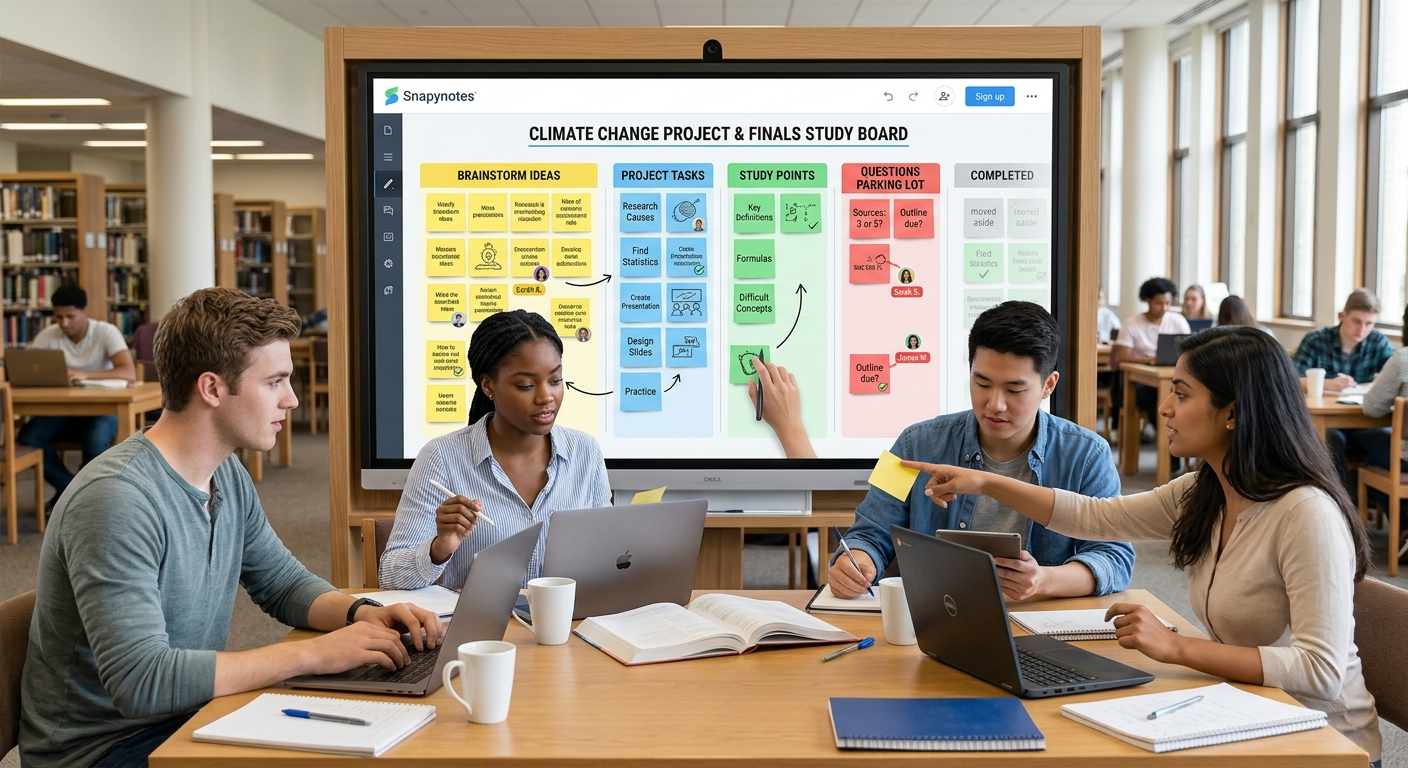
Group projects sound simple until the work actually starts. One person has an idea but forgets to share it. Another person is keeping notes in a notebook. Someone else has the project deadline saved in their phone. Then, when the group finally meets, everyone spends the first 15 minutes figuring out what has already been done.
Online sticky notes collaboration for students can make this process much easier. Instead of keeping ideas, tasks, questions, and study points in different places, students can put them into one shared visual space. It works for group projects, study sessions, brainstorming, revision, and even those last-minute planning sessions before a deadline.
Here's how to make online sticky notes actually useful instead of turning them into another place to dump information.
Ready to try it? Create a shared Snapynotes board and use it as a simple workspace for your next group project or study session.
Students already use sticky notes because they're quick. You can write one thought, move it around, group it with another idea, and throw it away when you no longer need it.
The digital version keeps that same simplicity while making it easier for people working from different places to contribute.
This is especially useful for student groups because not everyone works in the same way.
One student might be good at generating ideas. Another might naturally organize information. Someone else might be better at checking details or keeping track of deadlines.
A shared board gives everyone a place to contribute.
It also means the group doesn't have to rely on one person's notebook or memory.
Before dividing up the work, get the whole project out of your heads and onto the board.
Start with the project title in the middle and create notes for everything the group needs to figure out.
For example, imagine you're preparing a presentation about climate change.
Your first board might contain notes such as:
At this stage, don't worry about making the board look perfect.
The goal is simply to see the work.
Once everything is visible, you can group related notes and decide who will handle each part.
This is much easier than trying to divide a project through a long group-chat conversation.
A useful rule is simple:
One sticky note = one task or idea.
Instead of:
"Research climate change statistics, find sources, create graphs, and add them to the presentation."
Break it into:
Smaller notes make it easier to see what still needs to be done.
Online sticky notes aren't only useful for group projects.
They're also surprisingly handy for studying.
Suppose you have an exam coming up. Create separate areas for each topic and add short notes containing:
You can then move notes between sections such as:
Need to Learn → Reviewing → Confident
This creates a simple visual picture of your progress.
It can also help when studying with friends.
Each student can add questions to the same board. Then, instead of spending the entire study session asking, "What should we study?", you already have a list of topics to work through.
A study session doesn't have to mean sitting on a video call while one person explains everything.
Try using online sticky notes to make everyone participate.
For example, choose a chapter and give each student five minutes to answer:
"What are the five most important things we should remember from this chapter?"
Everyone adds their answers to the shared board.
Then compare them.
You may find that several students picked the same concepts. Those can become your main revision topics.
You may also find that one student has added something nobody else thought of. That gives the group a natural starting point for discussion.
Digital sticky notes can also work well for quick activities such as:
Everyone posts an answer.
Each student adds one concept they don't fully understand.
Everyone writes the most important thing they learned.
Students add questions they think could appear on the test.
These activities keep the study session focused instead of turning it into an unstructured conversation.
Once you have dozens of notes, the board can become confusing.
That's where a simple color system helps.
For example:
You don't need five or six colors if your group doesn't need them. Even two or three consistent categories can make a big difference.
The important thing is that everyone understands what the colors mean.
If you're working on a group assignment, you can also use labels for different people or sections of the project.
For example:
Now, instead of scrolling through a long chat history to find out who is doing what, the group can quickly see the current state of the project.
Here's a small problem that causes a lot of wasted time in student groups:
Someone asks a question in the group chat.
Nobody answers immediately.
The conversation continues.
Two days later, someone asks the same question again.
A shared sticky-note board can act as a simple question parking lot.
Whenever someone gets stuck, add a note:
Once the question has been answered, update or remove the note.
This keeps small questions from disappearing inside a busy group chat.
It also helps quieter students because they don't have to interrupt a conversation just to ask something.
Not every student has the same schedule.
One person may work best in the morning. Another might only have time in the evening. Someone may be commuting or working a part-time job.
That can make group projects difficult.
A shared online board gives students a way to contribute without everyone needing to be online at exactly the same moment.
For example:
The project keeps moving even when everyone isn't available at the same time.
This kind of asynchronous collaboration is one reason digital sticky notes can be useful in student projects. Educational guidance from Stanford Teaching Commons, for example, describes online sticky notes as suitable for both synchronous and asynchronous student activities.
If your group doesn't know where to start, keep the process simple:
Everyone adds ideas, tasks, or questions.
Move similar notes together.
Decide who is responsible for each task.
Students complete their sections and update the board.
Check what is finished and what still needs attention.
Move completed work aside and focus on the remaining tasks.
The point isn't to create a complicated project-management system. It's to give the group a shared picture of the work.
Online sticky notes are simple, but a few habits can make them much more effective.
Don't write everything on one note. Long paragraphs are difficult to scan. Keep each note focused.
Don't create too many categories. A simple board is easier to maintain than one with 15 different sections.
Don't leave completed work mixed with unfinished work. Move completed notes aside so everyone knows what still needs attention.
Don't use the board only before the deadline. A quick weekly update can prevent a lot of last-minute confusion.
Don't turn every note into a formal task. Some notes can simply be ideas, questions, or reminders. Let the board reflect what your group actually needs.
For a student group, you don't necessarily need a complicated collaboration platform just to collect ideas and organize a project.
Snapynotes provides digital sticky notes that students can create, organize with colors and labels, and share through a simple link. It works across desktop, mobile, and tablet devices, which makes it practical when group members are working from different places.
You could create one shared board for a project and use it for:
If you're also using sticky notes to manage your personal workload, our guide on How Digital Sticky Notes Improve Office Productivity explains some of the broader ways digital notes can help with organization.
You can also explore our guide to the best online sticky note applications if you want to understand the different ways online sticky-note tools can be used.
Students can use them to brainstorm ideas, divide project tasks, organize research, track questions, plan presentations, and keep everyone updated on what still needs to be completed.
Start with a few simple categories such as Ideas, To Do, In Progress, Questions, and Completed. Add more categories only if the project actually needs them.
Yes. Students can use shared sticky notes to create questions, summarize lessons, organize difficult topics, compare answers, and identify areas that need more revision.
Yes. Students can add and organize notes at different times, which can be useful when group members have different schedules.
Keep notes short, use a consistent color or label system, remove outdated information, and regularly move completed tasks out of the active work area.
Group projects don't usually fail because students have no ideas.
More often, the problem is that the ideas, tasks, questions, and deadlines end up scattered between different people and different apps.
Online sticky notes collaboration for students gives everyone a simple shared space to put those things together.
Use one board for the project. Keep one idea or task on each note. Let everyone contribute. Review the board regularly.
For study sessions, use the same idea to collect questions, summarize difficult topics, and make revision more interactive.
You don't need a complicated system.
Sometimes, a simple shared board is enough to turn "Who was doing that?" into "It's right there on the board."
Start your next group project or study session with Snapynotes and give everyone one simple place to work together.